

Billing & Budgets
Free forever plan available. No credit card required.
From tracked hours to an invoice-ready report — without a spreadsheet in between
Teetrack turns time tracking into billing-ready data. Set an hourly rate and currency per project, mark tracks as billable or non-billable, watch budgets before they overrun, and export a clean timesheet your client — or your invoicing tool — can consume directly. Every tracked minute keeps the rate that applied when the work was done, so later rate changes never rewrite past earnings.
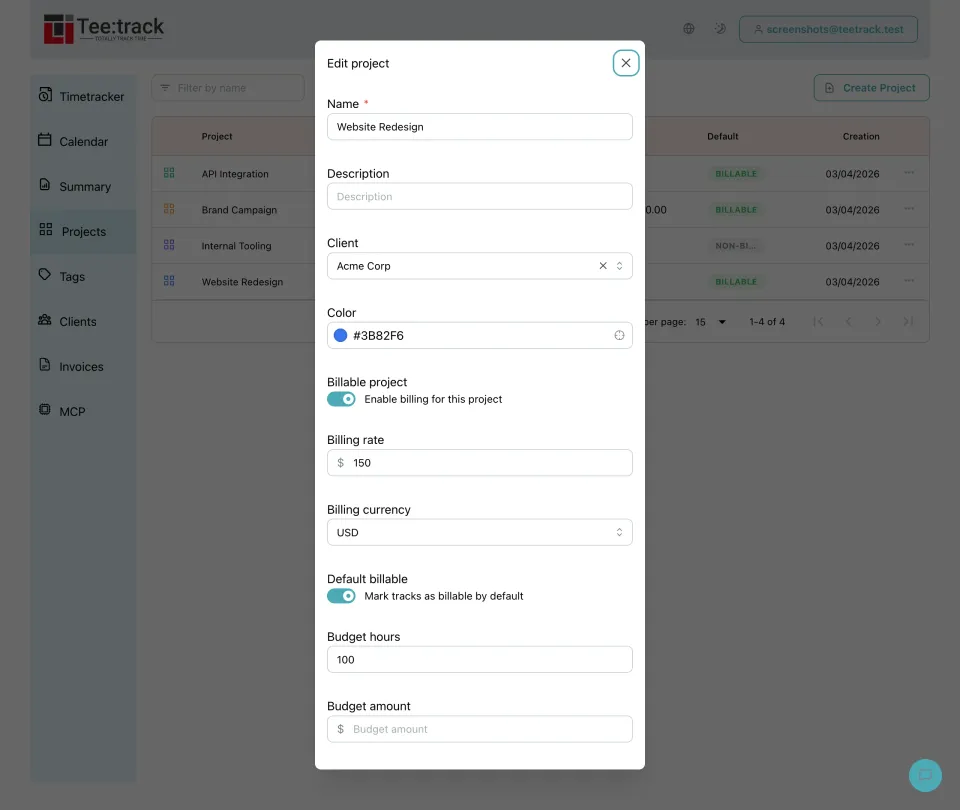
See it in action
Why bill from your time tracker
- Rates live with the work: Each project carries its own hourly rate and currency, so hours are valued correctly the moment you stop the timer — no end-of-month reconstruction.
- Billable vs. non-billable, per track: Projects set the default, but any individual track can be flipped, so internal work and client work coexist in one history without polluting invoices.
- Historical rates stay accurate: Tracks store the rate that applied when they were recorded. Raise your rate next quarter and past reports still show what you actually earned.
- Budgets warn before overruns: Give a project an hours or amount budget with an alert threshold and see the burn-down before you quietly exceed the estimate.
- Multiple currencies, one overview: Bill a Berlin client in EUR and a London client in GBP; summaries keep the currencies separate and correct.
How billing works in Teetrack
- Set a rate on the project: Open a project, enable billing, and enter the hourly rate and currency. New tracks in that project inherit both automatically.
- Track as usual: Start and stop timers exactly as before — billing metadata rides along without extra input.
- Round for clean invoices: Apply quarter-hour (or 1, 6, 30, 60 minute) rounding so exported amounts match how you actually invoice.
- Review earnings in the Summary: The Summary screen shows billable totals and amounts per project, client, and period.
- Export and invoice: Download a PDF timesheet for the client or a CSV for your accounting or invoicing tool — the numbers arrive final, not raw.
Billing features in detail
- Per-project rate & currency — each billable project defines its own hourly rate and currency; defaults can come from the linked client.
- Applied-rate snapshots — every track stores the rate and currency that applied at recording time, keeping history immutable.
- Budgets — hours- or amount-based budgets per project, with alert thresholds and progress display.
- Time rounding — round up, down, or to nearest across 1, 6, 15, 30, and 60 minute intervals for billing-friendly totals.
- Exports — PDF timesheets with your branding (Pro) and CSV exports for a clean handoff to invoicing and accounting tools.
See what each tier costs on the pricing page.
Billing FAQ
Does Teetrack create invoices?
Teetrack prepares invoice-ready data — rated, rounded, exportable timesheets — and hands it to whatever invoicing tool you already use. It deliberately does not replace your accounting software.
Which plans include billing?
Billing and budget tracking are included in the Business (€4/month), Pro (€19/month), and Enterprise tiers. The Free tier covers time tracking without billing features.
Can I use different rates for different clients?
Yes. Rates are set per project (with client-level defaults), so each engagement can have its own rate and currency.
What happens to old tracks when I change a rate?
Nothing. Tracks keep the rate that applied when they were recorded, so historical reports and totals stay accurate.
Ready to take control of your time?
Start tracking in under a minute. Free forever plan, no credit card.
No credit card required