

Profitability Report
You know how many hours you tracked. This report tells you what they were worth.
The profitability report turns your tracked time into the numbers a freelance business actually runs on: revenue per project, the share of your hours that was billable, the hourly rate you effectively earned, and — once you set a personal target rate — the margin each engagement produced. No spreadsheet exports, no team-analytics suite, no surveillance. Just your own clean time entries, priced.
Start tracking free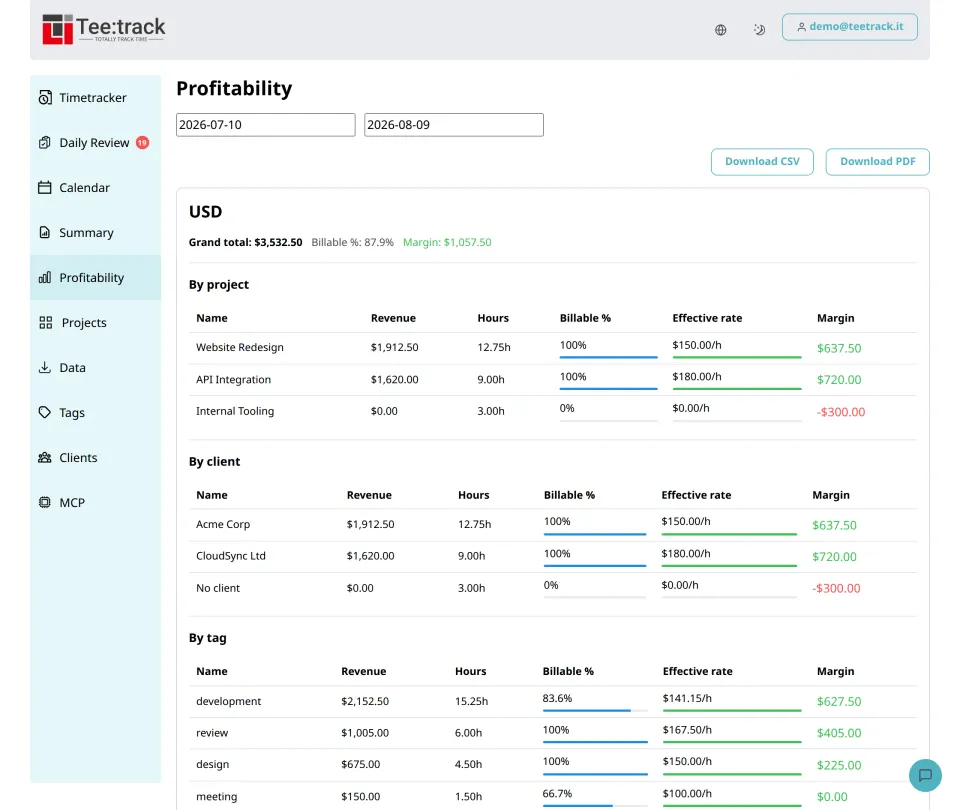
See it in action
Why a profitability report, not just a summary
- Utilization for one person: The Billable % column shows what share of your tracked hours actually gets paid — per project, per client, and in total. Most tools reserve utilization for team plans; here it is a solo metric.
- Your effective rate, not your list rate: Revenue divided by all hours worked — including the unbillable ones — is the rate you really earned. Seeing it next to your list rate is often the most useful number in the report.
- Margin against your own target: Set the hourly rate an hour of your work should earn, and every row shows whether it beat that bar. Internal work shows up as red, priced at what it displaced.
- Three angles on the same hours: The same numbers roll up by project, by client, and by tag — so you can see that a client is fine while one of their projects is not, or that meetings drag your rate down across everything.
- Currencies stay separate: A euro client and a dollar client never get mashed into one fake total. Each currency gets its own section with its own totals, rates, and margin.
How it works
- Track like you already do: The report is computed from your normal time entries — billable flags, rates, and currencies they already carry. There is nothing extra to log.
- Pick a date range: Any period works: last month for an invoice sanity check, last quarter for a client review, the whole year for tax season.
- Set a target rate once: One number in your settings — what an hour of your work should earn — and the margin column appears wherever that currency applies.
- Read the reds: Rows below target or at zero percent billable are the report doing its job: showing which work pays for your time and which quietly consumes it.
- Export when you need it elsewhere: Download the report as CSV for your spreadsheet or accountant, or as a PDF you can read, file, or send along with an invoice — utilization included in both.
What the report includes
- Per-bucket metrics — revenue, hours, billable hours, Billable % (utilization), effective hourly rate, and margin — for the grand total and for every project, client, and tag.
- Target rate & margin — a personal target hourly rate with currency, set once in your settings; margin is computed for the matching currency group.
- Currency grouping — one section per currency, sorted by revenue, with independent totals — multi-currency work never blends.
- Rounding-aware — your configured time rounding (up, down, nearest; 1 to 60 minute intervals) is applied before totals, so the report matches how you bill.
- Exports — CSV and PDF downloads on the Pro tier, with the same columns the on-screen report shows.
Rates, budgets, and billing in detail: Billing & Budgets. See what each tier costs on the pricing page.
Profitability FAQ
What exactly is the Billable % (utilization) column?
It is the share of your tracked hours that is marked billable — computed per project, client, tag, and in total. Fully billable client work shows 100%, internal work shows 0%, and the grand total is your personal utilization for the period.
Which plans include the profitability report?
Business (€4/month) includes a preview with the top three rows per category; Pro (€19/month) unlocks the full report plus CSV and PDF export. On the Free tier the page shows an illustrative example.
Do I have to set a target rate?
No. Without one you still get revenue, hours, utilization, and effective rate. The target rate only powers the margin column — set it once in your reporting settings whenever you want that comparison.
How is the effective rate different from my hourly rate?
Your hourly rate is what you charge for billable hours. The effective rate is revenue divided by all hours in the row — billable or not — so it shows what your time actually earned once unbillable work is counted.
Does Teetrack turn this into invoices?
No — deliberately. The report prices your time and exports clean data; invoicing stays in the dedicated tool you already use. Teetrack also ships CSV exports in Toggl, Harvest, and Clockify formats for easy handoff.
Ready to take control of your time?
Start tracking in under a minute. Free forever plan, no credit card.
No credit card required