

PDF Timesheets
Build a client-ready proof of work from the time you already tracked
Teetrack can turn reviewed time entries into a PDF timesheet that is easy to share with clients, managers, or accounting. Choose the relevant date range, filter by a project or a shared tag when needed, and generate a document that presents tracked work in a professional layout. It is useful when you need billing support, an approval record, or an audit-friendly summary of what was done.
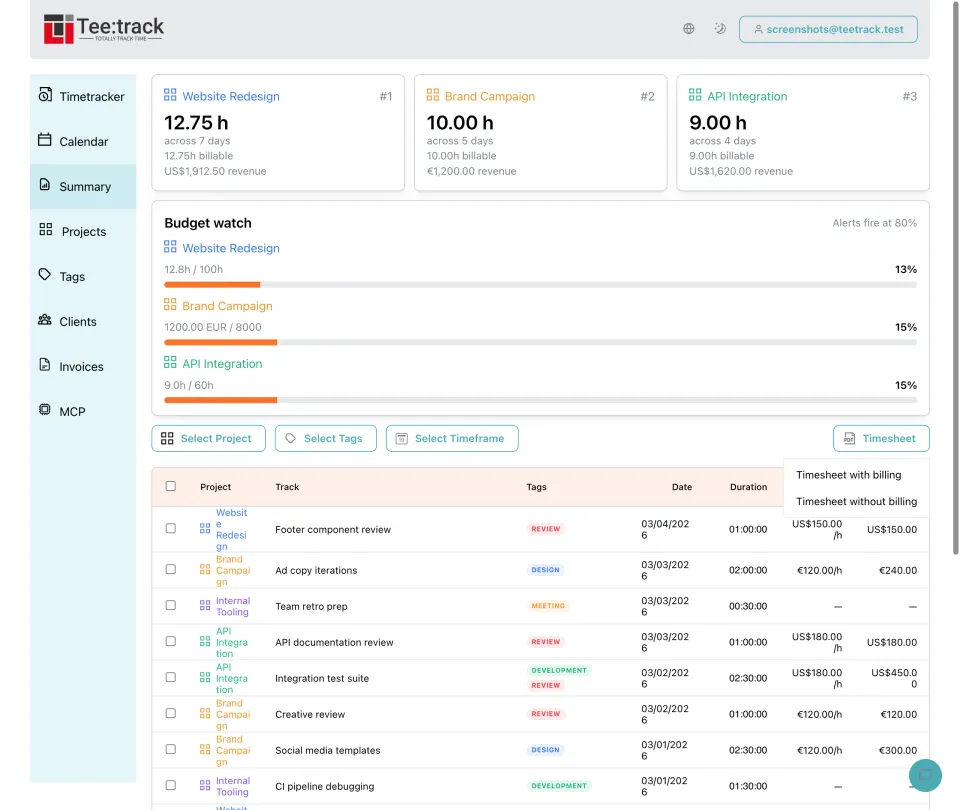
Why generate a timesheet PDF
- Professional output: Instead of sending raw app screenshots or copied table rows, you can provide a clean PDF that is easier for others to read and archive.
- Filter before exporting: Select a project and billing period, or use a shared tag for the intended entries across several projects. Check the included work before sharing.
- Useful for invoicing support: Attach the PDF when an invoice needs backup detail about dates, durations, and the nature of the recorded work.
- Good for manager approvals: A timesheet can be shared internally when someone needs to review or sign off on hours before finance processes them.
- Helpful for audits and proof of work: When a client asks what was done during a period, the PDF provides an organized snapshot of the time history behind the bill.
- Generated from tracked data: The PDF uses the recorded, unrounded durations and amounts. Summary applies your rounding setting, so its totals may differ from the PDF.
How to generate a Teetrack timesheet
- Select the reporting period: Choose the date range that should appear in the document, such as one work week, one month, or a custom billing interval.
- Apply project or tag filters: Select one project, or use a shared tag applied to the relevant client entries. Summary has no client filter, so verify that the selected entries cover the intended scope.
- Review the included entries: Check the filtered table before export to make sure descriptions, projects, and durations look complete and accurate.
- Generate and share the PDF: Open Timesheet and choose with billing or without billing. Leave billing out when the recipient needs a record of hours without rates or amounts.
What the PDF timesheet is useful for
- Date range coverage — Show exactly which period the document represents.
- Project-specific exports — Prepare one PDF per project when different stakeholders need separate reports.
- Client-specific reports — Use a shared tag for the intended client entries, or prepare a separate PDF for each project in the chosen period.
- Professional layout — Present tracked work in a format that is easier to forward, print, and file.
- Invoice backup — Use the PDF as supporting material when billed hours need additional explanation.
- Audit trail — Keep a shareable record of what was worked on and when it happened.
- Proof of work — Document completed effort for retainers, fixed review cycles, or external approvals.
- Manager or client sharing — Send a single file instead of asking others to access the app directly.
Frequently asked questions about PDF timesheets
Can I generate a timesheet for a specific project only? Yes. Apply the project filter before generating the PDF and the export will reflect only the selected scope.
Can I create one timesheet per client? Use a shared tag covering the intended entries across the client’s projects and choose the period. Alternatively, export each project separately. There is no client filter; check that the selection is complete and contains no unrelated work.
Is the timesheet useful even if I already send invoices? Definitely. Invoices show what is owed; timesheets provide supporting detail about the time behind those billed amounts.
When should I generate the PDF? The best moment is after reviewing your entries in Summary, because that is when durations, descriptions, and filters have already been checked.
Who typically receives the PDF? Clients, project managers, team leads, and finance contacts are common recipients whenever hours need to be reviewed, approved, or archived.
Ready to take control of your time?
Start tracking in under a minute. Free forever plan, no credit card.
No credit card required