Track billable hours for client timesheets
By Tristan Doehl · · Updated
When you invoice by the hour, a total is only useful if the client can understand the work behind it. Consistent project names, specific descriptions, and an agreed rounding policy connect your time records to an invoice that can be checked.
Record each session against its engagement
Create a project for each engagement and start a timer when you begin a session. Before changing tasks, describe what you completed or investigated. Writing that description while the work is fresh avoids having to reconstruct several similar sessions at the end of the month.
Billable status and hourly rates require Business or higher. Whether a session should be marked billable depends on the agreement: a planning call may be included in one contract and charged separately in another. Mark internal administration and other non-billable work accordingly, then check those flags before using the amounts on an invoice.
Follow a session through to the invoice
Consider an illustrative day with two sessions: 09:14 to 12:06 and 13:02 to 17:40. The first lasts 2h 52m and the second 4h 38m, giving 7h 30m of actual work. The gap between the sessions is excluded.
Suppose the contract specifies rounding each entry to the nearest quarter hour at €120 per hour. The first session becomes 2h 45m and the second becomes 4h 45m. Their rounded total is still 7h 30m, or 7.5 decimal hours. The amount before any applicable tax is therefore 7.5 × €120 = €900.
Rounding each entry can produce a different result from rounding a daily total. Two seven-minute entries each round to zero under a nearest-quarter-hour rule, while their combined fourteen minutes round to fifteen. Teetrack rounds per entry, and only when you choose a mode such as “Round to nearest” under Track Rounding Mode in the settings, with the interval set under Track Rounding Interval. Rounding is off by default. Summary applies that setting, but the PDF timesheet uses unrounded durations and amounts. The equal totals in the worked example are a coincidence, not a guarantee that the two outputs agree.
Make descriptions understandable outside the project
A client’s finance team may read your timesheet without having attended the meetings. Give each entry enough context for that reader. “Updated pricing page layout and checked mobile spacing” identifies the work more clearly than “Website updates.” “Planning call: agreed launch tasks and review dates” explains the purpose of a meeting.
Descriptions do not need to reproduce your task history. Include the activity and the relevant result or question, then keep sensitive details in the project’s own records. The timesheet should help the recipient recognise the work without exposing unrelated client information.
Review one client and one period at a time
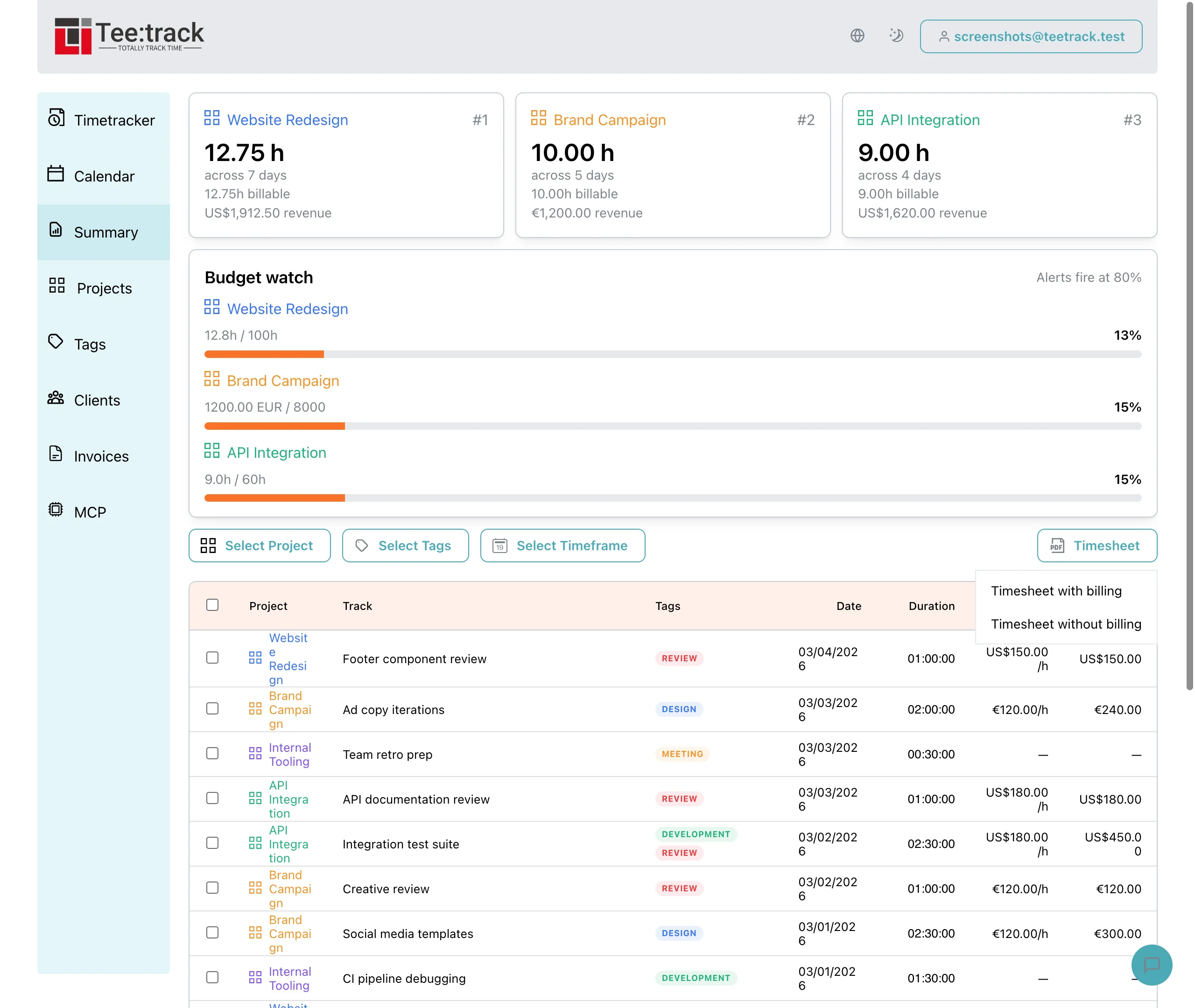
In Summary, select the billing period and one of the client’s projects. Repeat for each project, or use a shared client tag that covers the intended work without including another client’s entries. Review the dates, descriptions, billable status, and durations before generating the PDF.
Use the PDF to verify actual work. If the invoice uses rounded hours, reconcile it with the agreed calculation and explain the difference from the unrounded PDF. Teetrack supplies the time record; your invoicing tool handles the invoice and payment process.
Make the review part of billing
Checking recent entries regularly leaves fewer uncertain details at month end. The final billing review can then focus on the agreed scope and total, supported by a timesheet whose entries explain how that total was reached.