

Client Management
Organize projects around the people who pay you
Teetrack's client management feature lets freelancers, agencies, and consultants attach a client record to every project. Store contact details, default billing rates, and tax information in one place so you never have to re-type client data again. Whether you manage one client or one hundred, Teetrack's client management keeps your time tracking and project management connected from start to finish.
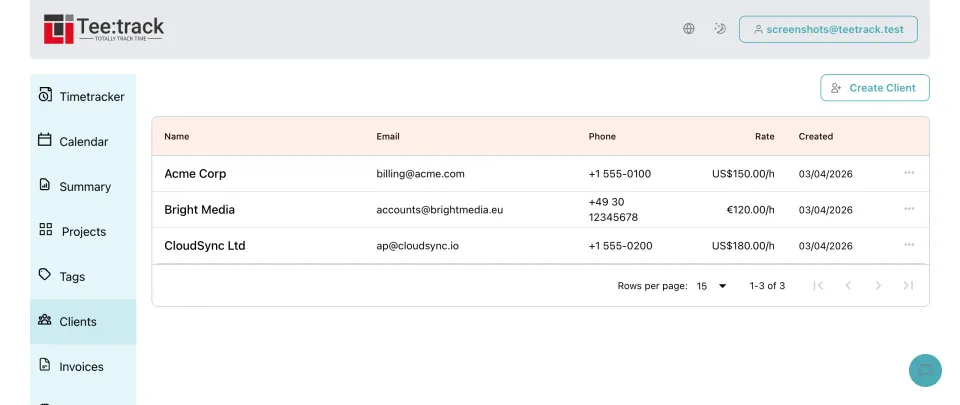
Why freelancers and teams love client management
- Single source of truth: Name, email, phone, address, tax ID, and notes are stored once per client. Every project linked to that client inherits the context automatically.
- Default hourly rate and currency: Set a client-level hourly rate and currency. When you create a new project for that client, Teetrack auto-fills the billing rate and currency so you can start tracking billable time immediately.
- Safe deletion: Teetrack prevents you from deleting a client that has linked projects, protecting your time records and reporting history.
- Multi-tenant security: Client records are scoped to your account. No one else can see, edit, or link to your clients.
How client management works in Teetrack
- Create a client: Open the Clients page from the sidebar, click Create Client, and fill in the details. Only the name is required; everything else is optional.
- Link to a project: In the Create Project or Edit Project form, select a client from the searchable dropdown. The project's billing rate and currency update to match the client's defaults instantly.
- Edit or delete: Update client details at any time from the Clients table. Delete a client only when no projects reference it.
Client fields at a glance
- Name — (required) — the client or company name.
- Email — contact email address.
- Phone — primary phone number.
- Address, City, State, ZIP, Country — full postal address.
- Tax ID — VAT number, EIN, or other tax identifier.
- Hourly rate — default rate auto-filled into new projects.
- Currency — USD, EUR, GBP, CAD, or AUD.
- Notes — free-form text for payment terms, special instructions, etc.
Frequently asked questions about client management
Can I link multiple projects to the same client? Yes. A client can have as many projects as you need. Each project maintains its own billing settings once created.
What happens to projects if I delete a client? Teetrack blocks deletion when projects reference the client. If no projects reference the client, deletion removes the link without deleting those records.
Do clients affect time tracking? Clients organize your projects. Time tracks remain linked to projects, and the client relationship flows through the project association.
Is client data visible to other users? No. Every client record belongs to a single user account. Teetrack enforces strict multi-tenant isolation at the database and API level.
Ready to take control of your time?
Start tracking in under a minute. Free forever plan, no credit card.
No credit card required