Client Management in Teetrack: How I Finally Stopped Losing Track of Who Owes Me Money

Client Management in Teetrack: How I Finally Stopped Losing Track of Who Owes Me Money

2/11/2026

The client management problem for freelancers

Most time tracking tools treat "client" as a text field you type into an invoice. That means your client's name can be "Acme," "Acme Inc," or "Acme Inc." depending on the day. Their billing rate lives in a sticky note. Their address lives in an email thread from six months ago. If you are a freelancer managing multiple clients, this ad-hoc approach to client management leads to invoicing errors, missed payments, and wasted time that should be billable.

Teetrack's new client management feature solves this by giving every client a first-class record in your account. A client in Teetrack stores the company name, email, phone, full postal address, tax ID, notes, a default hourly rate, and a default currency. You create the record once and then link it to as many projects and invoices as you need. No more re-typing, no more inconsistencies.

How I set up my clients in Teetrack

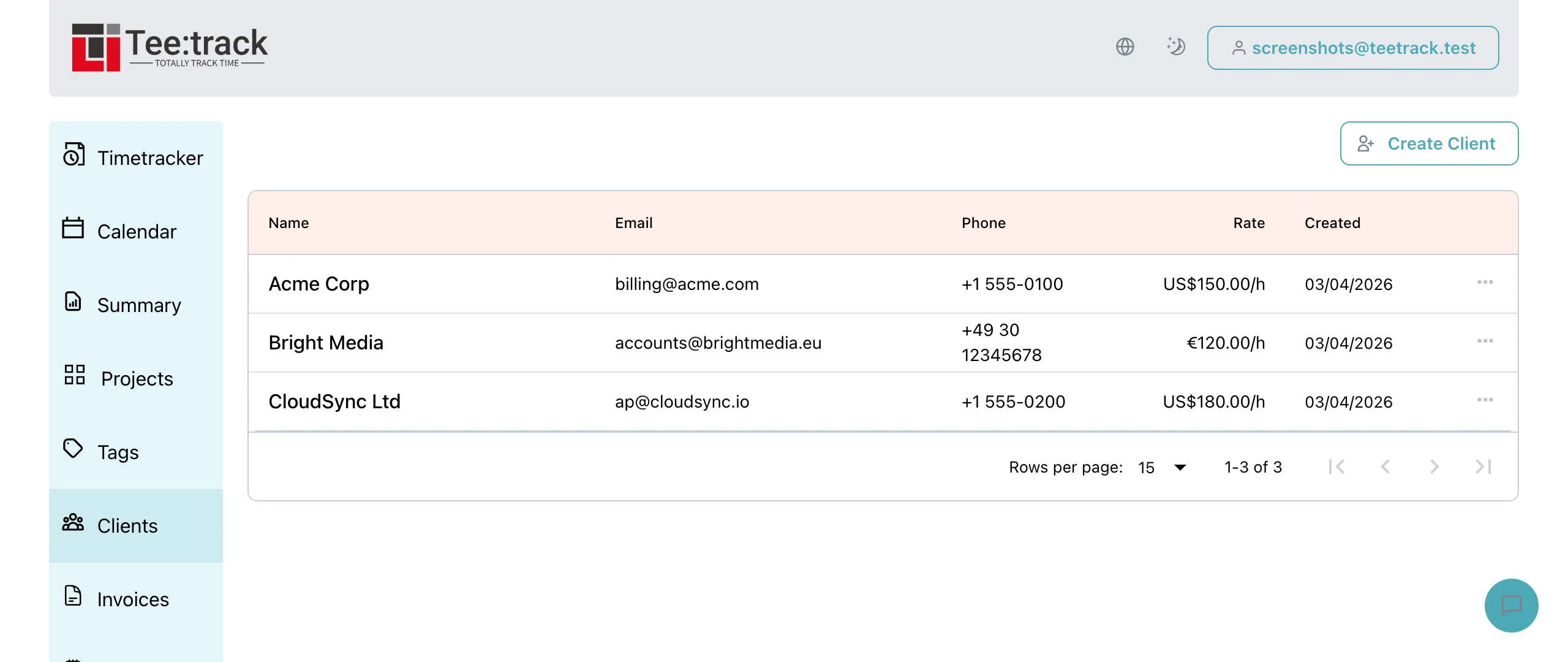
Setting up client management in Teetrack took me about five minutes. I opened the Clients page from the sidebar, clicked Create Client, and filled in the form. The only required field is the client name, so I added names and hourly rates first and came back later to add addresses and tax IDs for invoicing.

  • Name: The company or person you are billing. Teetrack enforces uniqueness per account so you cannot accidentally create duplicates.
  • Email & phone: For quick reference when you need to chase a late payment.
  • Address fields: Street, city, state, ZIP, and country. These are handy when your invoices need a billing address.
  • Tax ID: VAT numbers, EINs, or any identifier your accountant asks for.
  • Hourly rate & currency: This is the magic. Set a default rate and currency on the client and Teetrack auto-fills them into every new project you create for that client.
  • Notes: I use this for payment terms, PO numbers, and "always CC the finance team" reminders.

Linking clients to projects

Once your clients exist, the Create Project and Edit Project forms show a new searchable Client dropdown. Select a client and two things happen immediately: the project's hourly rate updates to the client's default rate, and the currency switches to the client's currency. You can still override these per project, but starting from the client defaults saves me a couple of minutes on every new project.

This link between client and project is the backbone of Teetrack's client management. Every time track you log against that project is now implicitly associated with the client. When it is time to invoice, that association carries forward automatically.

Clients on invoices

The invoices table now has a Client column, which means I can scan my invoice list and immediately see which client each invoice belongs to. Click into an invoice and the client name appears in the detail header alongside the project, status, and dates.

Even better, when I generate an invoice from billable tracks in the Summary view, Teetrack checks whether all the selected tracks belong to projects with the same client. If they do, the invoice's client field is auto-filled. One less thing to remember, one less chance to send an invoice to the wrong contact.

Safe deletion and data integrity

I accidentally tried to delete a test client that had a sent invoice. Teetrack returned a clear error: "Cannot delete client with sent invoices." That is exactly the kind of guard rail a freelance invoicing tool needs. Your sent invoices are your accounting record; ripping the client out from under them would be a disaster for bookkeeping and for tax time.

If the client only has draft invoices or just projects, deletion removes the link without deleting those records. Projects and drafts simply become "unlinked," which is safe and reversible.

Client management and multi-currency freelancing

Two of my clients pay in GBP, two in EUR, and two in USD. Before client management I had to remember which currency each project used. Now I set the currency on the client record and every new project inherits it. Combined with Teetrack's multi-currency invoice totals, my end-of-month billing run went from an hour of cross-referencing to fifteen minutes of clicking "Generate Invoice."

How client management fits into the Teetrack workflow

  • Create clients on the Clients page with name, rates, and contact info.
  • Create projects and select a client. Billing defaults auto-fill.
  • Track time against projects on the dashboard as usual.
  • Generate invoices from billable tracks. The client auto-fills if all tracks share one.
  • Review invoices with the client column for at-a-glance organization.
  • Export PDFs and CSVs that now include the client name in the header.

FAQ: Client management in Teetrack

Can I assign multiple projects to the same client? Yes. A client can have unlimited projects. Each project keeps its own billing settings after creation.

Does the client hourly rate override the project rate? No. The client rate is a default that auto-fills when you create a new project. Once the project exists, its rate is independent and can be changed without affecting the client or other projects.

Can I filter invoices by client? Yes. The invoice list supports filtering by client ID through the API, and the client column in the table makes visual scanning effortless.

Is my client data private? Absolutely. Client records are scoped to your account with strict multi-tenant isolation. No other user can access your client data.

What currencies are supported? USD, EUR, GBP, CAD, and AUD. The currency is set per client and inherited by new projects.

Client management keywords and related terms

  • freelance client management
  • client invoicing software
  • time tracking with client management
  • organize invoices by client
  • freelancer billing tool
  • client hourly rate defaults
  • multi-currency client billing
  • project client association
  • invoice client auto-fill
  • client contact management for freelancers
  • small business client tracking
  • best time tracker with CRM features

Start managing your clients today

If you have ever sent an invoice to the wrong address, billed the wrong rate, or spent twenty minutes hunting for a client's tax ID, Teetrack's client management is built for you. Head to teetrack.it, open the Clients page, and create your first client record. Every project and invoice you create from that point forward will carry the right client context automatically. Your future self at tax time will thank you.

Sanjay Mehta

Sanjay Mehta

Sanjay helps early-stage startups build brand identities and go-to-market strategies. He juggles four to six retainer clients at any given time, which means invoicing accuracy and client organization are survival skills. When he is not building pitch decks he is attempting to grow chili peppers on a London balcony.