

Time Tracker
Run live timers, fix entries later, and keep every minute attached to the right work
Teetrack is built for real working days, not idealized ones. You can start a fresh track, stop it when you switch context, restart a previous activity, or run multiple timers in parallel when several tasks need separate records. Each track stays connected to the project, tags, and client context behind it, and retroactive editing makes it easy to clean up your timeline before billing or reporting.
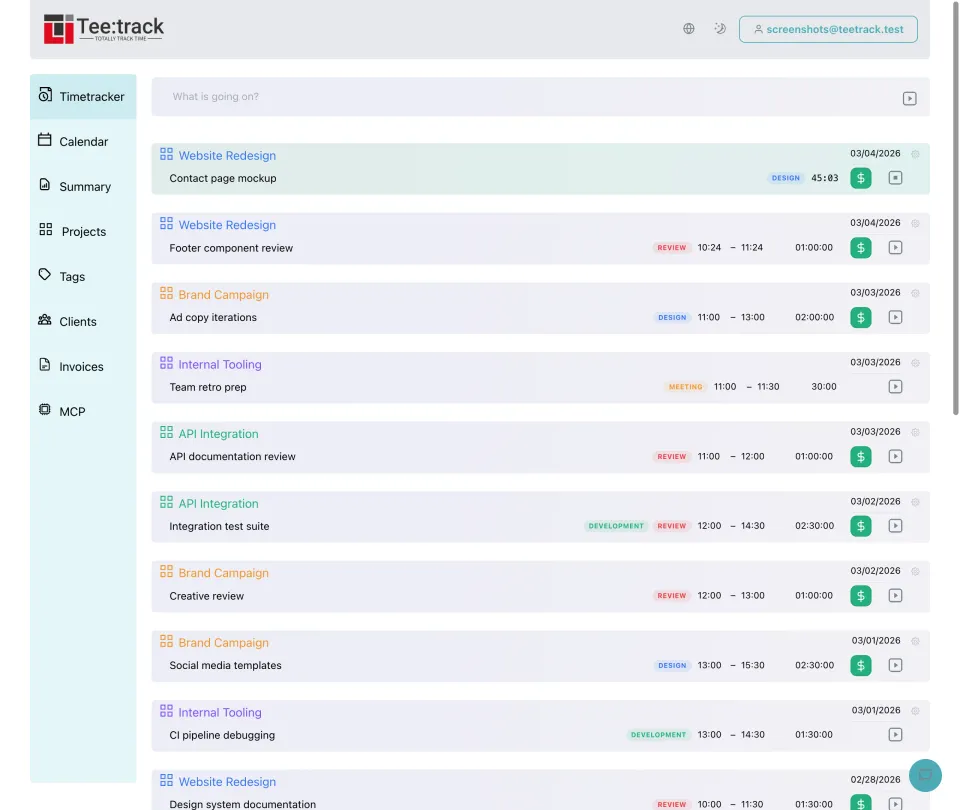
See it in action
Why the time tracker is more than a simple start-stop timer
- Fast start and stop controls: Begin tracking from the main timer view with one click, pause when work stops, and resume without creating manual spreadsheet rows for every interruption.
- Restart existing work: When a task comes back later in the day, restart an earlier track instead of rebuilding the same description, project, and tag setup from scratch.
- Multiple simultaneous timers: Teetrack supports several active tracks at the same time, which is useful when you monitor overlapping processes, support queues, or concurrent client requests.
- Retroactive corrections: If you forgot to start a timer or stopped it late, edit start time, end time, duration, project assignment, or notes afterward so reports stay accurate.
- Connected to project structure: Every track can be tied to a project, which means the recorded time automatically flows into project totals, client reporting, and billing workflows.
- Tag-based detail: Use tags to separate billable work from admin tasks, development from meetings, or one deliverable from another without creating unnecessary extra projects.
How time tracking works in Teetrack
- Start a track: Create a new time entry, choose the project and tags you want to track against, and start the timer. The running entry begins counting immediately.
- Stop or restart: Stop the active timer when the task ends, or restart a previous track to continue the same kind of work later with its original context intact.
- Run parallel entries when needed: If two streams of work must be documented separately, keep more than one timer active and let Teetrack preserve each track as its own record.
- Edit the finished entry: Open the saved track and adjust start time, end time, duration, description, project, or tags whenever your day needs cleanup before review or billing-tool handoff.
What you can control on each tracked entry
- Start time — Set the exact beginning of the tracked session.
- End time — Stop the entry live or enter the finishing time manually later.
- Duration — Review the total recorded time for each track before it reaches reports.
- Project — Assign work to the project that should receive the time total and billing context.
- Client context — Through the linked project, each track can be associated with the client who requested the work.
- Tags — Label work by activity, deliverable, department, or any custom reporting category you use.
- Description or task note — Keep a readable explanation of what happened during the tracked session.
- Restart source — Reuse an existing entry as the basis for a new live timer when work repeats.
Frequently asked questions about the time tracker
Can I have more than one timer running at once? Yes. Teetrack supports multiple simultaneous running tracks, so you can document overlapping work streams as separate entries.
What if I forgot to start the timer? You can edit the entry afterward and set the correct start and end times retroactively. That keeps your history accurate even when the live timer was missed.
Do tracks have to belong to a project? Projects are the best way to organize and report tracked time, and they also connect the entry to a client and billing setup when needed.
Can I continue a previous task without re-entering everything? Yes. Restarting an old track lets you continue similar work with the same project and tag context instead of creating the entry from zero again.
Are edits reflected in summaries and timesheets? Yes. Once you correct a track, the updated duration and assignments flow through to summary views, project reports, and generated timesheets.
Ready to take control of your time?
Start tracking in under a minute. Free forever plan, no credit card.
No credit card required