

Projects
Use projects as the operational layer between raw time entries and client-facing reporting
Projects give structure to the hours you track. Instead of keeping time as a flat list of unrelated entries, you can group work under a named project, attach the correct client, apply the right billing rate, and monitor progress against a budget. That makes projects central to day-to-day tracking as well as to later reporting, billing-tool handoff, and client communication.
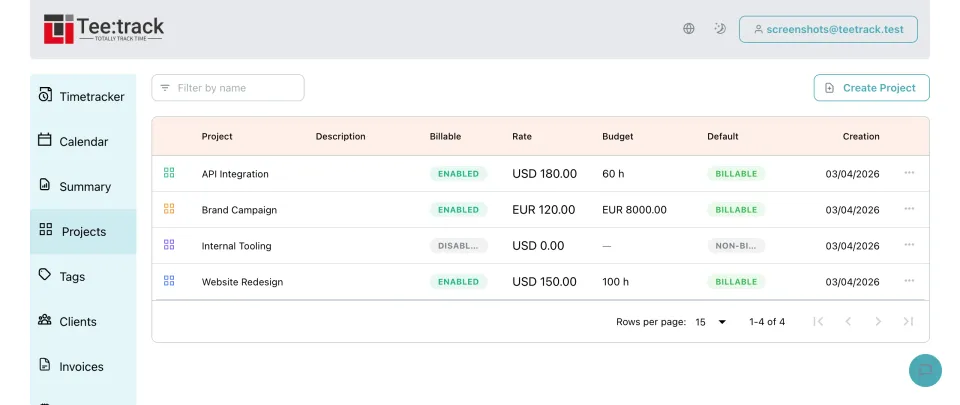
Why project structure matters
- Group related tracks: Time entries that belong to the same initiative, retainer, or delivery stay together instead of being scattered across your full history.
- Attach the right client: Projects connect operational work to the customer who requested it, which keeps summaries and exported reports easier to understand.
- Set billing rates once: A project can carry its own billing rate so the work inside it follows the correct commercial context without repeated manual adjustments.
- Use colors for quick recognition: Project colors help visually separate work areas in the interface, which is useful when many active projects run side by side.
- Watch project budgets: Budgets make it easier to compare tracked time against the expected limit before a project quietly overruns its planned effort.
- Review time per project: Project-based reporting helps answer practical questions such as how much time a client received, what a delivery actually cost, or where the month went.
How projects work in Teetrack
- Create the project setup: Start with a project name, then add the client, billing rate, color, and budget information that should define the work container.
- Assign tracks while working: When you start or edit a time entry, attach it to the relevant project so the recorded hours automatically roll up into that project view.
- Monitor progress and spend: Use the accumulated tracked time to compare actual effort against the project budget and identify when a scope needs attention.
- Use project reports downstream: Because time is grouped correctly, summaries and timesheets can all reference the same organized project structure.
What a project can hold
- Project name — A clear label for the workstream, engagement, or delivery.
- Client assignment — Link the project to the customer responsible for the work.
- Billing rate — Define the commercial rate that should apply when the project is billed via your external billing tool.
- Currency context — Keep project billing aligned with the financial setup inherited from the client when applicable.
- Project color — Visually separate the project from others in lists and selection controls.
- Budget — Track the planned limit and compare it with actual recorded effort.
- Tracked time totals — See how much time has accumulated on the project through linked entries.
- Report readiness — Use the project grouping as the basis for summaries, timesheets, and billing-tool handoff.
Frequently asked questions about projects
Why should I track time by project instead of only by task description? Projects give your time entries a stable reporting structure. Descriptions explain what you did, while projects explain where that work belongs commercially and operationally.
Can a project be linked to a client and a billing rate? Yes. That is one of the main benefits. A project can carry the client relationship and the billing setup that later supports your billing-tool handoff and reporting.
How do budgets help in daily use? They help you notice when tracked effort is approaching or exceeding what was planned, so you can react before the overrun becomes a billing or scope problem.
Do project colors matter beyond appearance? Yes. They are a practical visual aid when your workspace contains many ongoing projects and you need faster recognition in selectors and lists.
Will project assignments appear in reports and timesheets? Yes. Once time is linked to a project, that structure carries through to summaries, timesheets, and other reporting views built from tracked entries.
Ready to take control of your time?
Start tracking in under a minute. Free forever plan, no credit card.
No credit card required