

Write client reports that explain decisions
By Tristan Doehl · · Updated
A client report is useful when the reader can connect the work completed with the agreement and the next decision. Time records support that explanation, but a list of entries alone does not show whether a deliverable is finished or what the client needs to approve.
Start with the commitments for the period
Use the agreed deliverables as the structure for the opening section. State which are complete, in progress, or blocked, and provide links to the work where appropriate. This gives the reader a way to assess progress without interpreting every task description.
If an outcome is measured elsewhere, identify that source and period. Time spent on content does not establish an increase in traffic, and hours of engineering do not prove that a release met its quality target. Keep the work record connected to the outcome evidence without treating one as a substitute for the other.
Show enough hours to explain the budget
For an illustrative 30-hour monthly retainer, plan 8 hours for strategy, 12 for content, and 10 for distribution. Suppose the recorded work is now 8, 14, and 6 hours respectively: 28 hours used and 2 left. Content has exceeded its allocation by 2 hours, while distribution still needs 4 hours to finish its planned work.
Check how the agreement treats unused hours, additional work, and non-billable corrections. An allowance does not automatically roll forward merely because the report shows a remainder. If different workstreams have different rates, present the amount calculation as well as the hour total.
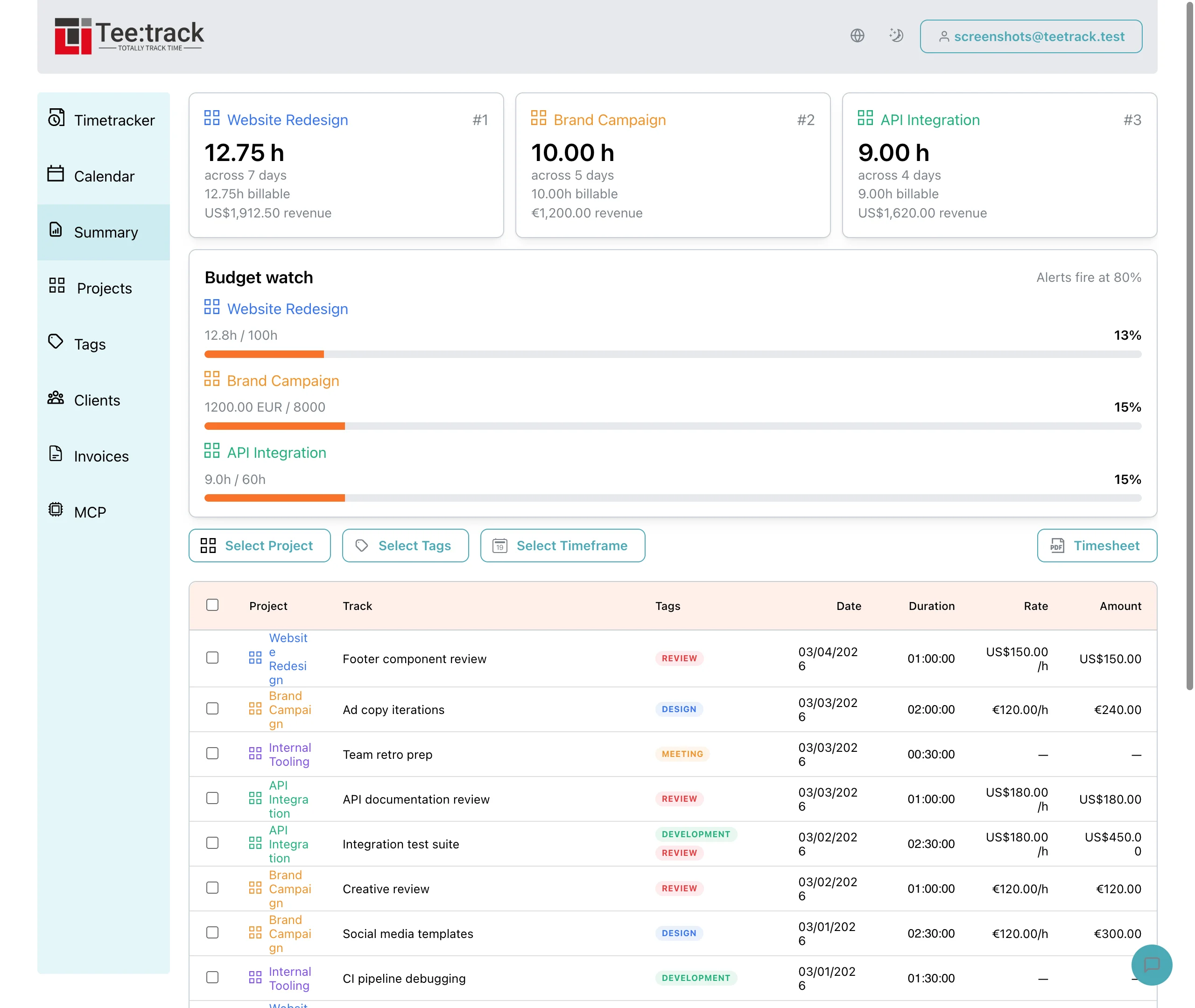
Use Summary to filter the relevant project, tags, and period, then review the entries before preparing the report. Where tags overlap, avoid adding their totals as if they partitioned the work. The Summary feature provides records for your report; the narrative still needs the engagement’s context.
Explain a variance with a cause and consequence
Suppose the additional content time came from a client-requested revision round. Explain its effect on the planned work: “The extra revision used two hours of the distribution allowance. Four hours of distribution work remain, with two hours left in the retainer. Please approve two extra hours, or we will complete two hours now and move the final two-hour distribution check to next month.”
That explanation connects the record to a decision. It is more useful than saying that the team was busy or that revisions took longer than expected. If the extra effort came from your own correction, explain its treatment honestly instead of presenting it as a new client request.
End with the next action and its date
List the next deliverables and identify any approval needed to keep their dates. For example: “Please approve the revised brief by Friday so we can begin the next content batch on Monday.” The request tells the client what to do and why the timing matters.
If no client action is required, say what the team will do next and when the client can expect another update. Avoid inventing an approval step merely to make the report end with a question.
Choose a format that suits the relationship
A concise email may be enough for an established engagement, while a PDF or shared document can suit a more formal review. Agree the cadence with the client and keep it predictable. A short project may need more frequent updates than a stable monthly retainer.
Keep a detailed timesheet available when the client needs to inspect sessions. The main report can remain focused on commitments and decisions, with the detailed record supporting any questions about hours.
Build the next report from a checked period
Select the period, reconcile its entries with the budget, update deliverable status, and write the explanation of any meaningful change. Reusing that structure reduces repeated formatting, but every period still needs a fresh review of the work and the agreement.
The agency time-tracking guide describes the recording foundation. A report built on checked records gives the client a clearer basis for decisions, even when the message is that a date or scope needs to change.
Frequently asked questions
What should the report contain?
Show the status of agreed deliverables, a relevant hours or budget breakdown, an explanation of meaningful changes, and the next action or decision. Keep supporting detail accessible.
Should I include every time entry?
Include the detail the relationship and agreement require. A short workstream summary can lead the report, with a timesheet attached or available for inspection.
How do I explain an overrun?
Identify the change, its cause, the time or amount involved, and the effect on remaining work. Distinguish client-requested scope from your own corrections and apply the agreed billing treatment.
How often should I send reports?
Agree a cadence that fits the project’s pace and the client’s decisions. Keep it predictable, and communicate a material issue when it arises rather than waiting for the next scheduled report.
Can I automate the report?
You can reuse the format and export the underlying time records. Deliverable status, outcome evidence, and the explanation of decisions still need verification for the particular period.