

Prepare a freelance invoice and its evidence
By Tristan Doehl · · Updated
A client needs enough information to recognise the work, approve the amount, and route the payment. A clear invoice and a matching timesheet help with those steps, although neither can guarantee when the client will pay.
Agree the billing process before delivery
Confirm the client’s legal billing details, the agreed rate or fee, the billing period, and the approval contact. Ask whether they require a purchase-order number or a particular submission method. Discovering those requirements after sending the invoice can create avoidable rework.
Agree a payment term before starting work and state the resulting due date on the invoice. Ask how long the client’s approval process normally takes and who handles an overdue approval. Those details help you plan cash flow and direct a reminder to the right person.
Build line items from reviewed work
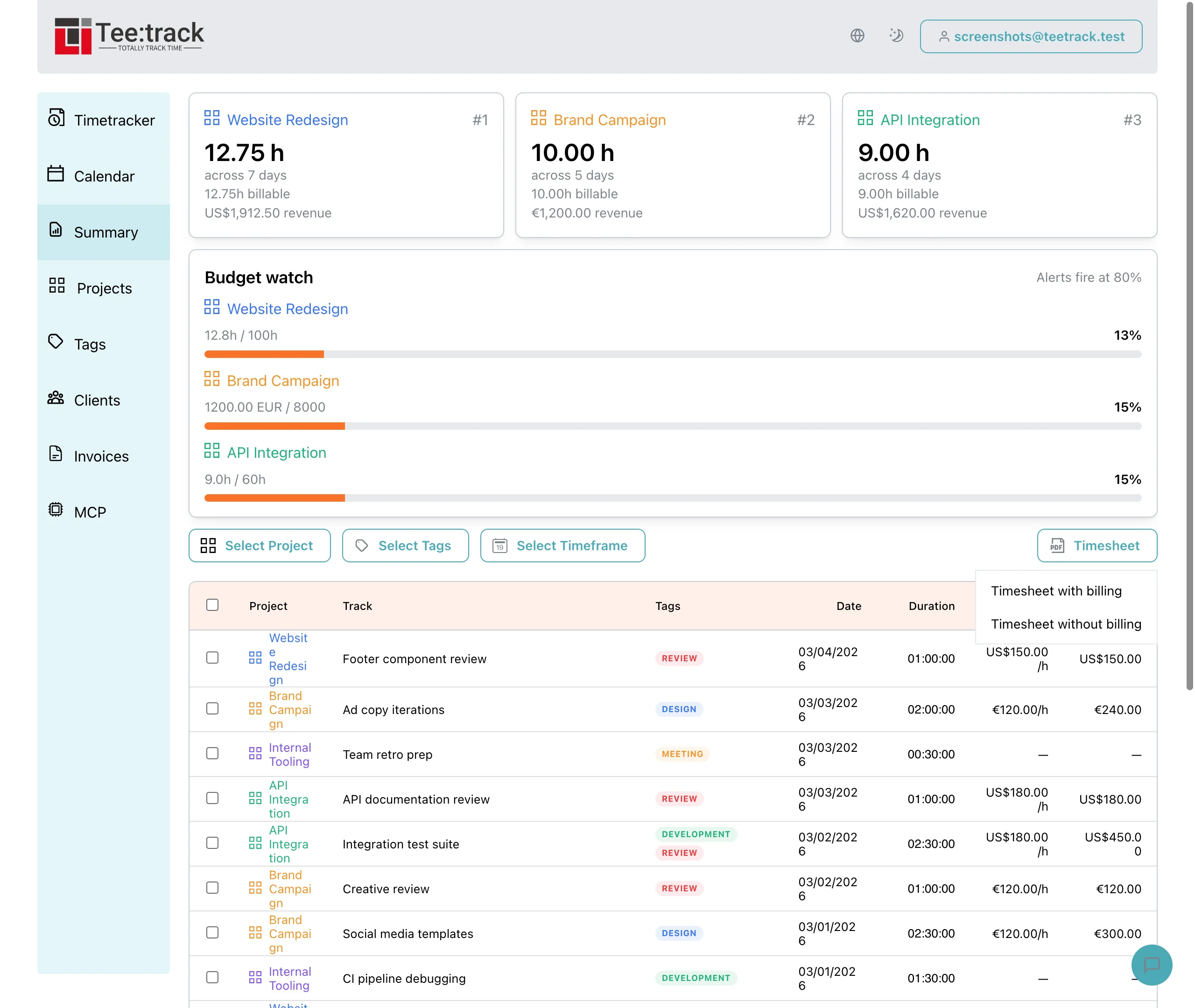
For hourly work, select the period in Teetrack Summary and filter to each of the client’s projects in turn, or use a shared tag covering the intended entries. Check descriptions and billable status. Summary applies Teetrack’s rounding setting; the PDF timesheet contains unrounded times and amounts. If billing uses rounded hours, keep the adjustment visible in your invoice calculation instead of expecting its total to match the PDF.
For an illustrative line item, twelve hours of checkout testing at €100 per hour give €1,200 before tax. The invoice can describe the service and period, while an attached timesheet supplies the individual sessions. A fixed-fee engagement should identify the agreed deliverable or milestone rather than imply an hourly charge that was never agreed.
Check the invoice details in your accounting system
Use an invoicing or accounting tool to issue the invoice and maintain its number, status, and any required corrections. Review the following operational details before sending it:
- The supplier and client identities match the engagement.
- The invoice number, issue date, service period, and due date are clear.
- The description, quantity, rate, and amount match the agreement.
- The currency, payment instructions, and any purchase-order reference are included.
- Tax treatment and any required invoice wording have been checked for the transaction.
Required fields depend on the transaction and jurisdiction. The European Commission’s VAT invoicing guidance explains EU VAT requirements and the role of national rules. Check the rules that apply to your business, including any required electronic invoice format, rather than treating a general checklist as a complete tax specification.
If you invoice from Germany, § 14 UStG lists the mandatory invoice details, and § 19 UStG covers the small-business VAT exemption. Every German business has had to be able to receive e-invoices since 2025, and the obligation to send them for domestic business-to-business invoices is being phased in through 2027 and 2028. The German Federal Ministry of Finance keeps an e-invoicing FAQ with the current rules.
Make payment instructions usable
State the currency unambiguously and provide the details required by the payment method you have agreed. For international work, decide who bears transfer charges and any currency conversion before the invoice is due.
If the client needs a payment reference, use the same invoice identifier in the payment instructions and follow-up messages. This makes it easier to match an incoming payment to the invoice when several engagements are active.
Follow up on the actual obstacle
After the due date, check whether the invoice was received and approved. A concise reminder should identify the invoice, outstanding amount, and due date, then ask whether anything is preventing processing. Missing approval and disputed scope need different responses.
If a client disputes the hours, refer to the agreed scope and the reviewed timesheet. If the invoice went to the wrong recipient, correct the routing. Keep a record of the response and the next agreed action instead of repeatedly sending the same message without investigating the delay.
Late fees and formal collection steps depend on the contract and applicable law. Do not assume that adding a percentage to an invoice creates an enforceable term. Check the relevant rules before applying charges or escalating a dispute.
Retain the link between work and payment
Teetrack provides the time evidence; your accounting system records invoice issue, corrections, and payment. Keep the two connected so an entry’s billable value is not mistaken for money already received. The freelance billing guide explains the wider process from rate calculation to a reconciled billing period.
Frequently asked questions
Is a timesheet the same as an invoice?
No. A timesheet describes recorded work and hours. An invoice requests payment and must meet the requirements applicable to the transaction. Use your accounting system to issue it and track payment.
What payment term should I choose?
Agree a term with the client that fits the engagement and applicable rules. State a clear due date and understand any approval or purchase-order process before relying on the payment timing.
What should I check before sending an invoice?
Check the recipient, scope, period, amounts, currency, payment instructions, due date, and any required reference. Confirm tax treatment and invoice-format requirements for your circumstances.
Can I add a standard late fee?
Do not assume a universal percentage applies. Late fees depend on the agreement and applicable law, so check the relevant rules before stating or charging them.
What should I do when payment is overdue?
Check receipt and approval, identify the outstanding invoice clearly, and ask what is preventing payment. Use the response to resolve missing information, a disputed amount, or the next appropriate follow-up step.