Billing in Multiple Currencies – Without Losing the Overview
By Tristan Doehl ·
Set Billing Per Project – In the Right Currency
The first thing I love about Teetrack's billing is that it works the way agencies actually operate: per project. When I create or edit a project, I can enable billing and choose the currency that matches the client contract. Some teams are billed in EUR, others in USD or GBP, and Teetrack supports these multiple currencies side by side without any extra juggling on my part.
For each project, I set the hourly rate and decide whether new time tracks should be billable by default. Designers, developers, and account managers just start and stop their teetracks as usual—behind the scenes, each track inherits the correct billing settings and currency from the project.
See Billing At a Glance on the Summary Page
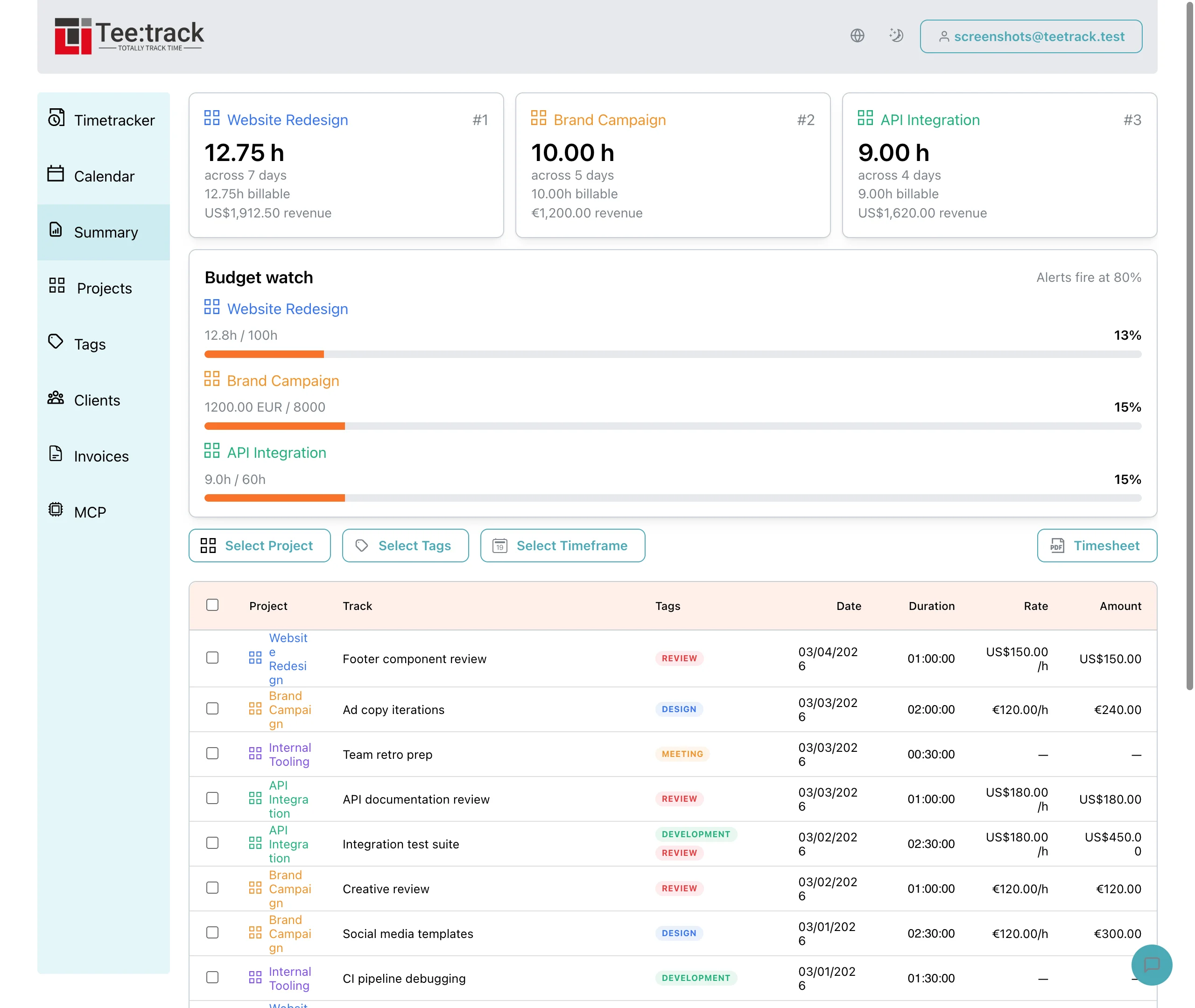
The Summary page is where I go to answer big questions quickly: How much billable time did we log this month? Which projects are approaching their budgets? With the new Billing feature, those answers are now part of the same overview my team already uses to review hours.
- Filter tracks by project, client, or time frame (like "Last Month") and see billable hours right next to total hours.
- View the calculated billing amounts in the project's currency, so I don't have to reach for a separate calculator or spreadsheet.
- Use the billing summary widgets to spot projects that are close to or over their budget, long before it becomes a surprise on the invoice.
Because billing is integrated directly into the Summary page, I can stay in one place to clean up any entries, adjust track details, and confirm that the numbers make sense before I invoice.
Turn Tracked Time into Billable Timesheets
Once I'm happy with a filtered view in Summary, I move on to the final step: creating the timesheet. The Timesheet functionality now includes billing as a selectable option, so I can decide exactly how much financial detail to show.
- For internal reviews, I generate a timesheet that shows both tracked hours and billed amounts, in the project's currency.
- For clients who only want hours, I toggle the billing columns off and send a simpler, hour‑only PDF.
- When I need full transparency, I include descriptions, rates, and totals so clients can see exactly how we arrived at the invoice amount.
The key is that billing is not a separate export or a second tool—it's an option that lives right inside the timesheet flow, using the same tracks my team already created.
Why This Changed How We Bill
Before Teetrack's Billing feature, month‑end meant manual conversions, copy‑pasting hours into different spreadsheets, and double‑checking formulas. Now, my team tracks their time like they always have, and the system takes care of the rest: multi‑currency billing per project, clear overviews on the Summary page, and flexible timesheets that fit each client's expectations.
If you're working with international clients or simply want a tighter grip on project profitability, this Billing setup is exactly the kind of calm, reliable backbone your business needs. You focus on the work—Teetrack keeps the numbers straight.