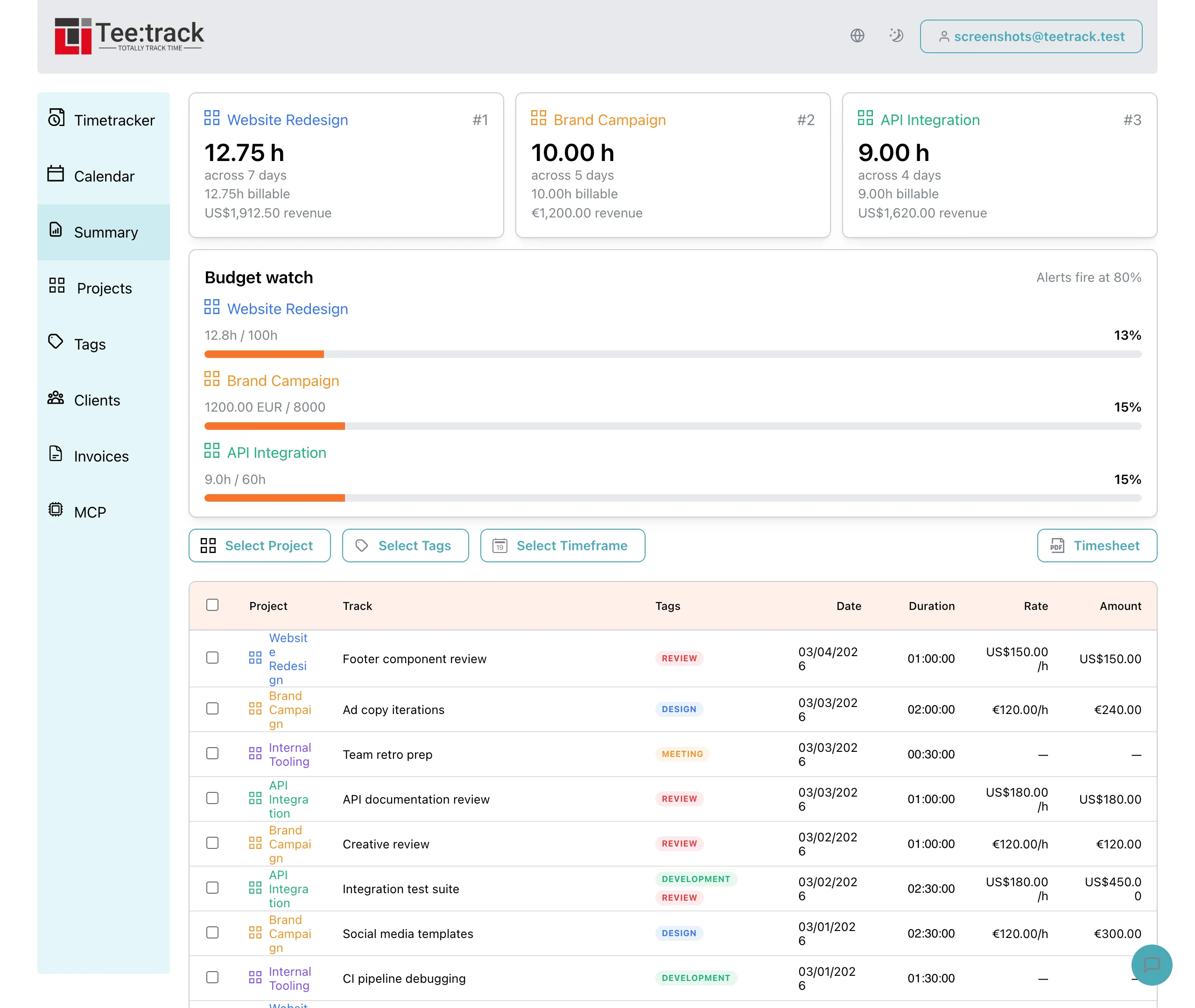
Teetrack's New "Summary" Feature
By Tristan Doehl ·
Why I needed a better way to review my hours
As a freelancer or remote worker, tracking your time efficiently is essential for both productivity and accountability. I’ve been using Teetrack for quite some time now, and in my previous post, I shared how this simple tool helped me track my work hours and provided an easy way to generate timesheets. It’s been a game-changer in my day-to-day workflow, but now, with the addition of the new "Summary" feature, Teetrack has taken my time-tracking experience to the next level.
What’s New with the Summary Feature?
The Summary page in Teetrack allows you to filter and sort through your past time entries with ease, presenting them in a clean and organized table format. If you're someone like me, who juggles multiple projects and clients, this feature makes reviewing your work history effortless. Here’s what makes the Summary feature stand out:
- Streamlined Time Management – Before the "Summary" feature, keeping track of which tasks I worked on during the week, and reviewing the time spent on each task, meant scrolling through entries and manually calculating totals. The new Summary page eliminates all that hassle. Now, I can view everything in one concise table, which makes it easy to see how much time I’ve spent on each specific task, project, or client.
- Easy Filtering and Sorting– One of the most useful additions to this feature is the ability to filter and sort entries. For example, if I need to see how many hours I spent writing blog posts for the media company I work for or on marketing projects for a client, I can filter by specific project tags. The sorting functionality is also a game changer—sorting by date or time spent allows me to get a quick overview of my work, which is especially helpful when submitting timesheets or reviewing productivity trends.
- Perfect for Timesheet Generation – For my role, where I need to submit timesheets regularly, the Summary page is a huge time-saver. By filtering my entries for a specific time period, I can quickly compile the hours worked and export the data with just a few clicks. This eliminates the need to manually compile and double-check my hours, and it streamlines the timesheet submission process to my manager. As a student and freelancer, anything that saves me time and reduces stress is a win!
The new Summary? Recommended!
If you’re someone who relies on Teetrack to track your work hours, you’ll quickly see how the new Summary feature enhances the user experience. Whether you're a freelancer juggling multiple clients, a remote worker managing various tasks, or simply someone who needs to generate accurate timesheets, this feature is incredibly useful. It’s intuitive, saves time, and provides valuable insights into how you spend your work hours. Teetrack continues to impress me with its ease of use and thoughtful features. The addition of the Summary page is a welcome upgrade that further solidifies its position as my go-to time tracking tool. If you haven’t yet tried it, I highly recommend giving it a go—especially if you’re in the market for an efficient way to manage your time and stay on top of your productivity! What do you think about Teetrack’s new Summary feature? Have you found it as helpful as I have? Let me know in the comments below!